

Why Alt-Text Matters for Local SEO
Your team just wrapped up a major project or finished a post-worthy event. You take a photo, upload it to your website’s news page, and call it a day. Easy enough, right? But there is a hidden mistake some business owners make: they leave the image name something like IMG_7139.jpg.
To you, it’s a simple portfolio piece. To Google, it’s a blank, unknowable space.
Alt-Text Explained
Think of Alt-Text like the barcode on the underside of a product at the grocery store. When you scan a box of cereal, the scanner doesn’t “see” the colorful box; it reads the code and tells the computer exactly what is being purchased.
Alt-Text works the same way. It is a short sentence embedded in your website’s code that tells Google exactly what is happening in an image. Since Google’s “robots” can’t actually see your photo, they rely entirely on this label to understand your content.
How to Write Alt-Text That Works
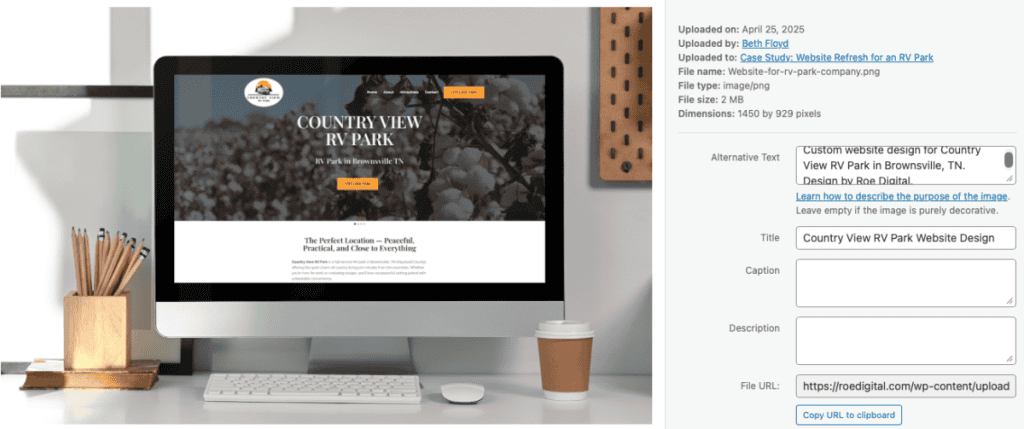
Instead of a random string of numbers, your Alt-Text should be a detailed description. A great local SEO formula is:[Service] + [Location] + [Context]
- Bad: IMG_7139.jpeg
- Good: Website-redesign.jpg
- Great: Website redesign showcase for (company name), a hardware store based in Jackson, Tennessee. Design by Roe Digital.
Why This Benefits Your Business
- Accessibility: It helps people with visual impairments navigate your site using screen readers.
- Image Search: When local customers search for “custom cabinets near me,” your properly labeled photos are much more likely to show up in Google Images.
- Local Context: It tells Google exactly where you operate, reinforcing your presence in the West Tennessee market.
Don’t just “dump” photos into your media library. Take thirty seconds to give them a proper barcode. Google will reward you for the clarity, and your customers will find you faster.