
Google Ads: How to Stop Paying for the Wrong Clicks
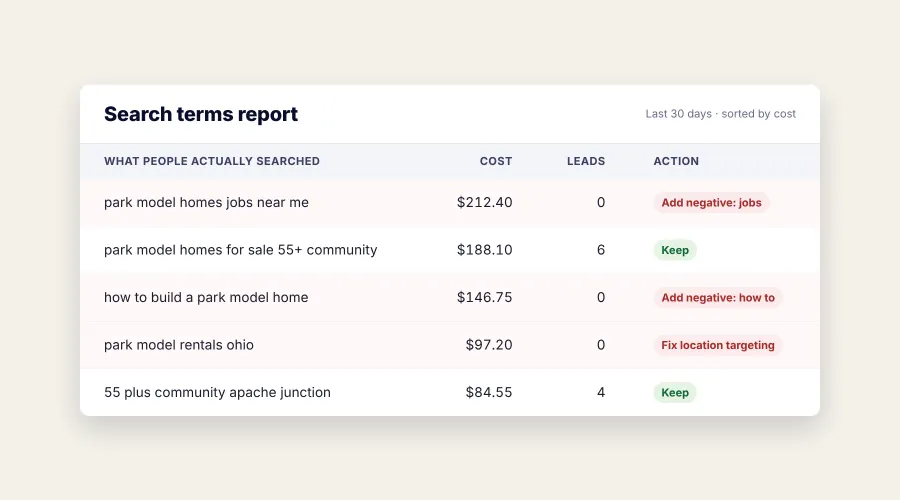
Every Google Ads account is paying for clicks that were never going to turn into anything. Job seekers. People doing homework. Somebody three states away who found you by accident.
The good news is that Google will show you many of them, if you know where to look. Most business owners have never opened the report that tells them.
Here is how to check, and what to do about what you find.
Why Google shows your ad for the wrong searches
When you set up a search campaign, you tell Google which searches should trigger your ad. What surprises most people is how loosely Google interprets that.
Say you sell park model homes. You tell Google you want to appear for “park model homes for sale.” Google decides that “how to build a park model” is close enough. Same words, completely different person. One is a buyer. The other is watching videos on a Saturday afternoon.
Multiply that across every term in your account and you start to see where a small budget goes.
Open the search terms report
This is the single most useful screen in Google Ads, and it is the one that goes unread on most accounts we take over.
Inside your account, look under the reporting or insights section for Search terms. Google moves the menus around, so if it isn’t where you expect, search “search terms” in the account’s own search bar and it’ll take you there.
What you’re looking at is not the keywords you chose. It’s the actual words people typed before your ad appeared.
One thing to know before you start. Google doesn’t show you every search. A share of them get withheld for privacy reasons, so the costs in this report won’t add up to what you actually spent. You’re seeing most of it, not all of it. That’s still plenty to work with.
Set the date range to the last 30 days and start reading.
What to look for: job seekers, researchers, and the wrong location
Almost everything worth blocking falls into three groups:
People looking for a job. This is the biggest one and almost nobody accounts for it. If you advertise for a community, you’ll see “maintenance jobs” and “groundskeeper hiring.” A contractor will see “electrician apprenticeship” and “construction careers.” An equipment dealer will see “diesel mechanic salary.” These people click at a healthy rate. None of them are customers.
People researching or planning to do it themselves. “How to,” “free guide,” “what is a,” “template,” “DIY.” There is nothing wrong with these searches. They’re just not the person who is about to call you.
People in the wrong place or after the wrong thing. Someone searching for tent camping is not leasing an RV site for the season. Someone looking for apartment rentals is not buying a home. And a click from outside your service area is money you spent on a customer you could never serve.
Out-of-area clicks need a different fix
You can’t solve this one with negative keywords. If you’re a Tennessee business, adding “Ohio” as a negative doesn’t stop somebody in Ohio from searching your service and seeing your ad.
There’s a setting for it. When you pick the locations you want to target, Google gives you options underneath. The default “Presence or Interest” setting includes people who have shown interest in your area, not just people who are in it. Someone in Ohio reading about Arizona can count as interested.
Switch it to “Presence: People in or regularly in your targeted locations.” It’s one setting, and it’s on the broader option in many accounts we take over.
Sort the report by cost, highest first. The expensive mistakes float to the top.
Cost tells you where the money went. What you want is where the money went and nothing came back.
If your account is tracking conversions, meaning it knows when somebody calls, fills out a form, or books, the report has a column for it. Sort by cost, then look for terms that spent real money and produced zero. Those are your answers.
If conversion tracking isn’t set up, fix that before any of this (it is the first thing we check when we take over a Google Ads account). Without it you’re guessing at which clicks were good, and you’ll still be guessing next month.
Your ad can do some of this work for you
Negative keywords stop the wrong searches. Your ad itself stops the wrong people.
If your ad says “Park Model Homes” and nothing else, anybody curious about park model homes has a reason to click. If it says “Park Model Homes From $89,900. 55+ Community in Apache Junction,” the person who can’t afford it, isn’t old enough, or lives three states away has already decided not to.
Put the qualifiers in the ad. Price or price range. Location. Who it’s for. Whether you sell or rent. Minimum job size, if you have one.
This will lower your click rate, and that’s fine. A lower click rate on the right people beats a high one on everybody.
Add them as negative keywords
A negative keyword is how you tell Google no. Add the term as a negative and your ad stops appearing for that search entirely. You stop paying for it.
You can add them at the campaign level, and you can build shared lists that apply across multiple campaigns, which is worth doing for obvious employment terms like “job,” “jobs,” “hiring,” “careers,” “employment,” “salary,” and “apprenticeship.”
Negatives are more literal than you’d expect. Adding “job” does not stop “jobs,” so add the variations that matter. Google does automatically account for casing and misspellings, so you don’t need to build a separate list of typos.
And be careful what you block. “Free” looks safe until it blocks “free estimate,” which is exactly what a buyer types. “Cheap” can block people who would have bought from you anyway. Read the term and ask who typed it, not just whether the word looks bad.
This is not a minor optimization. On a $500 monthly ad budget, if a fifth of your clicks are going to job seekers and researchers, that’s $100 a month and $1,200 a year spent on people who were never buying anything. On a bigger budget the number just gets bigger.
Review the search terms report every month
This is the step that separates accounts that improve from accounts that don’t.
Building an exclusion list once is easy. Anyone can spend an afternoon on it. But search behavior keeps changing, and new irrelevant patterns show up constantly. A term that never appeared in your first six months turns up in the seventh. If nobody’s reading the report, that spend quietly continues.
Once a month is enough for most small accounts. It takes fifteen minutes after the first pass.
It’s also why an account is usually better in month three than in month one. The early spend buys you information. What you do with it is the actual work.
Why Google’s automation makes this matter more
Every year Google gives its own automation a little more room to decide which searches your ads appear for. The names of the features change. The direction doesn’t.
Some of that is genuinely useful. It finds phrasings you wouldn’t have thought to target, and it adapts faster than any list a person maintains by hand.
But the tradeoff is always the same. The looser the matching gets, the more searches your ad becomes eligible for, and the more of those are searches you’d never have chosen yourself. Your exclusion list stops being housekeeping and becomes the main control you have left.
Which is worth keeping in mind with Performance Max, a campaign type Google will often steer advertisers toward. Performance Max now has a dedicated search terms report that shows actual search terms along with landing pages, ad formats, and performance metrics. You can also apply negative keywords at the account or campaign level for its Search and Shopping inventory. But Performance Max runs across channels beyond Search, so this monthly search-term check only covers part of what the campaign is doing. You are still giving Google more room to decide how and where to reach people, so it is worth understanding what visibility and control you’re trading for the automation before you move budget there.
None of this is an argument against automation. Letting Google set bids usually beats setting them by hand. Letting it test headline combinations works, because it tests faster than a person can.
The line worth holding is between letting Google decide how to reach the right person and letting it decide who the right person is. The first is worth handing over. The second is your business, and you understand it better than the algorithm does.
If you’d rather have someone handle it
Reading a search terms report every month is not complicated, but it is the kind of task that quietly falls off the list when you’re busy running a business. That’s fair, and it’s a large part of what we do when we manage an account.
If you’re spending money on Google Ads and you’re not sure it’s landing in the right place, tell us what you sell and where you sell it. We’ll look at the searches you’re currently paying for and give you a straight answer on whether the budget is working.
Roe Digital manages Google Ads for businesses and organizations across Tennessee and nationwide. See how we approach Google Ads, or see what clicks cost in your market with our Google Ads cost calculator.
Frequently asked questions
What is a negative keyword in Google Ads?
A negative keyword tells Google which searches should never show your ad. If you add "jobs" as a negative, your ad stops appearing for anyone searching for jobs, and you stop paying for those clicks. Negatives are added at the campaign level or in shared lists that cover several campaigns.
How often should the search terms report be reviewed?
Once a month is enough for most small accounts, and it takes about fifteen minutes after the first pass. New irrelevant searches show up constantly, so an account reviewed once and never again drifts back toward wasted spend within a few months.
Does this work with Performance Max campaigns?
Yes. Performance Max now has its own search terms report that shows the actual searches your ads appeared for, and negative keywords can be applied to it. The matching is looser than in a standard search campaign, so reviewing it matters more, not less.
Should I block words like free and cheap?
Not automatically. "Free" blocks "free estimate," which is exactly what a buyer types, and "cheap" can block people who would have bought from you anyway. Read the full search term and ask who typed it before adding a negative.
How much does it cost to have someone manage this?
Roe Digital manages Google Ads for 15% of ad spend with a $500 monthly minimum, month to month, and reviewing the search terms report is part of every month's work. Our Google Ads cost calculator shows what clicks typically cost in your market and what a given budget could buy.